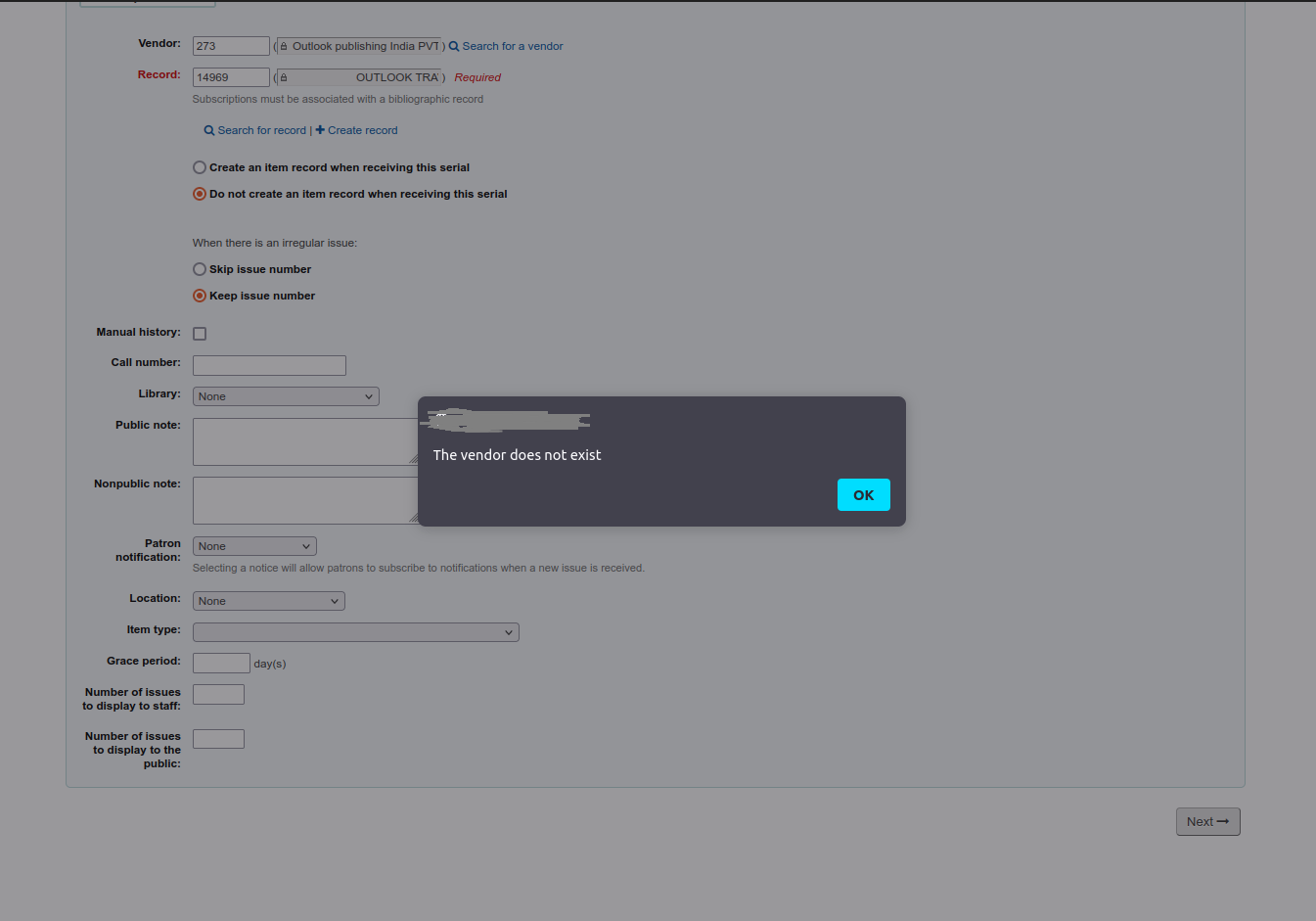
The vendor does not exist at serials/subscription-add.pl

Home › Serials › New subscription Unable to add new subscription in koha. vendor is available in koha, I am able to search for a vendor on the subscription edit form at serials/subscription-add.pl, but when i select vendor and biblio and click on next button it shows " The vendor does not exist " alert. I have upgraded koha version 19.11 to 20.11.06. Is there anything else I might want to examine that could be causing the problem? -- Thanks and Regards, Londhe Amar Software developer

Hi, The standard way to debug such errors in Koha are as follows 1) Completely clear browser cache and retry 2) If #1 does not work and error persists, check your browser console for errors 3) If #2 does not show anything OR does not show anything that is relevant to the error you are encountering, then tail the intranet-error.log and see what is logged when the error occurs on the GUI. Typically, the log file will show the actual Koha perl script or module which is throwing the error along with the line number. Then one should open that file, go to that line number and by reading the code figure out what is missing and cross check against the data in the database. thanks pretty much the basics of debugging Koha. hope this helps -- Indranil Das Gupta L2C2 Technologies Phone : +91-98300-20971 WWW : http://www.l2c2.co.in Blog : http://blog.l2c2.co.in IRC : indradg on irc://irc.freenode.net Twitter : indradg On Thu, 24 Mar 2022 at 13:29, Londhe Amar <amar@ourlib.in> wrote:
Home › Serials › New subscription Unable to add new subscription in koha.
vendor is available in koha, I am able to search for a vendor on the subscription edit form at serials/subscription-add.pl, but when i select vendor and biblio and click on next button it shows " The vendor does not exist " alert.
I have upgraded koha version 19.11 to 20.11.06.
Is there anything else I might want to examine that could be causing the problem?
-- Thanks and Regards, Londhe Amar Software developer_______________________________________________ Koha-devel mailing list Koha-devel@lists.koha-community.org https://lists.koha-community.org/cgi-bin/mailman/listinfo/koha-devel website : https://www.koha-community.org/ git : https://git.koha-community.org/ bugs : https://bugs.koha-community.org/
Hello, Thanks for quick response. I have tried all sorts of ways to identify the problem. 1) Tried to clear browser cache, 2) Tail log file: There is nothing in the log file. 3) The browser console is clean, no errors appear. -- Thanks and Regards, Londhe Amar Software developer On 24/03/22 1:38 pm, Indranil Das Gupta wrote:
Hi,
The standard way to debug such errors in Koha are as follows
1) Completely clear browser cache and retry
2) If #1 does not work and error persists, check your browser console for errors
3) If #2 does not show anything OR does not show anything that is relevant to the error you are encountering, then tail the intranet-error.log and see what is logged when the error occurs on the GUI. Typically, the log file will show the actual Koha perl script or module which is throwing the error along with the line number. Then one should open that file, go to that line number and by reading the code figure out what is missing and cross check against the data in the database.
thanks pretty much the basics of debugging Koha.
hope this helps -- Indranil Das Gupta L2C2 Technologies
Phone : +91-98300-20971 WWW : http://www.l2c2.co.in Blog : http://blog.l2c2.co.in IRC : indradg on irc://irc.freenode.net <http://irc.freenode.net> Twitter : indradg
On Thu, 24 Mar 2022 at 13:29, Londhe Amar <amar@ourlib.in> wrote:
Home › Serials › New subscription Unable to add new subscription in koha.
vendor is available in koha, I am able to search for a vendor on the subscription edit form at serials/subscription-add.pl <http://subscription-add.pl>, but when i select vendor and biblio and click on next button it shows " The vendor does not exist " alert.
I have upgraded koha version 19.11 to 20.11.06.
Is there anything else I might want to examine that could be causing the problem?
-- Thanks and Regards, Londhe Amar Software developer_______________________________________________ Koha-devel mailing list Koha-devel@lists.koha-community.org https://lists.koha-community.org/cgi-bin/mailman/listinfo/koha-devel website : https://www.koha-community.org/ git : https://git.koha-community.org/ bugs : https://bugs.koha-community.org/
-- Thanks and Regards, Londhe Amar Software Developer

Try /var/log/koha/$KOHA_INSTANCE/plack-error.log Or, watch them all with /var/log/koha/$KOHA_INSTANCE/*.log Le jeu. 24 mars 2022 à 09:21, Londhe Amar <amar@ourlib.in> a écrit :
Hello,
Thanks for quick response.
I have tried all sorts of ways to identify the problem.
1) Tried to clear browser cache,
2) Tail log file: There is nothing in the log file.
3) The browser console is clean, no errors appear.
-- Thanks and Regards, Londhe Amar Software developer
On 24/03/22 1:38 pm, Indranil Das Gupta wrote:
Hi,
The standard way to debug such errors in Koha are as follows
1) Completely clear browser cache and retry
2) If #1 does not work and error persists, check your browser console for errors
3) If #2 does not show anything OR does not show anything that is relevant to the error you are encountering, then tail the intranet-error.log and see what is logged when the error occurs on the GUI. Typically, the log file will show the actual Koha perl script or module which is throwing the error along with the line number. Then one should open that file, go to that line number and by reading the code figure out what is missing and cross check against the data in the database.
thanks pretty much the basics of debugging Koha.
hope this helps -- Indranil Das Gupta L2C2 Technologies
Phone : +91-98300-20971 WWW : http://www.l2c2.co.in Blog : http://blog.l2c2.co.in IRC : indradg on irc://irc.freenode.net Twitter : indradg
On Thu, 24 Mar 2022 at 13:29, Londhe Amar <amar@ourlib.in> wrote:
Home › Serials › New subscription Unable to add new subscription in koha.
vendor is available in koha, I am able to search for a vendor on the subscription edit form at serials/subscription-add.pl, but when i select vendor and biblio and click on next button it shows " The vendor does not exist " alert.
I have upgraded koha version 19.11 to 20.11.06.
Is there anything else I might want to examine that could be causing the problem?
-- Thanks and Regards, Londhe Amar Software developer_______________________________________________ Koha-devel mailing list Koha-devel@lists.koha-community.org https://lists.koha-community.org/cgi-bin/mailman/listinfo/koha-devel website : https://www.koha-community.org/ git : https://git.koha-community.org/ bugs : https://bugs.koha-community.org/
-- Thanks and Regards, Londhe Amar Software Developer
_______________________________________________ Koha-devel mailing list Koha-devel@lists.koha-community.org https://lists.koha-community.org/cgi-bin/mailman/listinfo/koha-devel website : https://www.koha-community.org/ git : https://git.koha-community.org/ bugs : https://bugs.koha-community.org/
Hello, I have checked all log files also checked apache2 error log but nothing is important in log file. is there any other way to solve this issue. Please help me to solve. ***We have installed koha through the command line standard installation process by downloading the tar.gz file, so we cannot use the koha command. ie. Koha-common. On 24/03/22 3:03 pm, Jonathan Druart wrote:
Try /var/log/koha/$KOHA_INSTANCE/plack-error.log
Or, watch them all with /var/log/koha/$KOHA_INSTANCE/*.log
Le jeu. 24 mars 2022 à 09:21, Londhe Amar <amar@ourlib.in> a écrit :
Hello,
Thanks for quick response.
I have tried all sorts of ways to identify the problem.
1) Tried to clear browser cache,
2) Tail log file: There is nothing in the log file.
3) The browser console is clean, no errors appear.
-- Thanks and Regards, Londhe Amar Software developer
On 24/03/22 1:38 pm, Indranil Das Gupta wrote:
Hi,
The standard way to debug such errors in Koha are as follows
1) Completely clear browser cache and retry
2) If #1 does not work and error persists, check your browser console for errors
3) If #2 does not show anything OR does not show anything that is relevant to the error you are encountering, then tail the intranet-error.log and see what is logged when the error occurs on the GUI. Typically, the log file will show the actual Koha perl script or module which is throwing the error along with the line number. Then one should open that file, go to that line number and by reading the code figure out what is missing and cross check against the data in the database.
thanks pretty much the basics of debugging Koha.
hope this helps -- Indranil Das Gupta L2C2 Technologies
Phone : +91-98300-20971 WWW : http://www.l2c2.co.in Blog : http://blog.l2c2.co.in IRC : indradg on irc://irc.freenode.net Twitter : indradg
On Thu, 24 Mar 2022 at 13:29, Londhe Amar <amar@ourlib.in> wrote:
Home › Serials › New subscription Unable to add new subscription in koha.
vendor is available in koha, I am able to search for a vendor on the subscription edit form at serials/subscription-add.pl, but when i select vendor and biblio and click on next button it shows " The vendor does not exist " alert.
I have upgraded koha version 19.11 to 20.11.06.
Is there anything else I might want to examine that could be causing the problem?
-- Thanks and Regards, Londhe Amar Software developer_______________________________________________ Koha-devel mailing list Koha-devel@lists.koha-community.org https://lists.koha-community.org/cgi-bin/mailman/listinfo/koha-devel website : https://www.koha-community.org/ git : https://git.koha-community.org/ bugs : https://bugs.koha-community.org/
-- Thanks and Regards, Londhe Amar Software Developer
_______________________________________________ Koha-devel mailing list Koha-devel@lists.koha-community.org https://lists.koha-community.org/cgi-bin/mailman/listinfo/koha-devel website : https://www.koha-community.org/ git : https://git.koha-community.org/ bugs : https://bugs.koha-community.org/
-- Thanks and Regards, Londhe Amar Software Developer
Hello , Please help to resolve this issue. On 24/03/22 3:21 pm, Londhe Amar wrote:
Hello,
I have checked all log files also checked apache2 error log but nothing is important in log file.
is there any other way to solve this issue. Please help me to solve.
***We have installed koha through the command line standard installation process by downloading the tar.gz file, so we cannot use the koha command. ie. Koha-common.
On 24/03/22 3:03 pm, Jonathan Druart wrote:
Try /var/log/koha/$KOHA_INSTANCE/plack-error.log
Or, watch them all with /var/log/koha/$KOHA_INSTANCE/*.log
Le jeu. 24 mars 2022 à 09:21, Londhe Amar <amar@ourlib.in> a écrit :
Hello,
Thanks for quick response.
I have tried all sorts of ways to identify the problem.
1) Tried to clear browser cache,
2) Tail log file: There is nothing in the log file.
3) The browser console is clean, no errors appear.
-- Thanks and Regards, Londhe Amar Software developer
On 24/03/22 1:38 pm, Indranil Das Gupta wrote:
Hi,
The standard way to debug such errors in Koha are as follows
1) Completely clear browser cache and retry
2) If #1 does not work and error persists, check your browser console for errors
3) If #2 does not show anything OR does not show anything that is relevant to the error you are encountering, then tail the intranet-error.log and see what is logged when the error occurs on the GUI. Typically, the log file will show the actual Koha perl script or module which is throwing the error along with the line number. Then one should open that file, go to that line number and by reading the code figure out what is missing and cross check against the data in the database.
thanks pretty much the basics of debugging Koha.
hope this helps -- Indranil Das Gupta L2C2 Technologies
Phone : +91-98300-20971 WWW : http://www.l2c2.co.in Blog : http://blog.l2c2.co.in IRC : indradg on irc://irc.freenode.net Twitter : indradg
On Thu, 24 Mar 2022 at 13:29, Londhe Amar <amar@ourlib.in> wrote:
Home › Serials › New subscription Unable to add new subscription in koha.
vendor is available in koha, I am able to search for a vendor on the subscription edit form at serials/subscription-add.pl, but when i select vendor and biblio and click on next button it shows " The vendor does not exist " alert.
I have upgraded koha version 19.11 to 20.11.06.
Is there anything else I might want to examine that could be causing the problem?
-- Thanks and Regards, Londhe Amar Software developer_______________________________________________ Koha-devel mailing list Koha-devel@lists.koha-community.org https://lists.koha-community.org/cgi-bin/mailman/listinfo/koha-devel website : https://www.koha-community.org/ git : https://git.koha-community.org/ bugs : https://bugs.koha-community.org/
-- Thanks and Regards, Londhe Amar Software Developer
_______________________________________________ Koha-devel mailing list Koha-devel@lists.koha-community.org https://lists.koha-community.org/cgi-bin/mailman/listinfo/koha-devel website : https://www.koha-community.org/ git : https://git.koha-community.org/ bugs : https://bugs.koha-community.org/
-- Thanks and Regards, Londhe Amar Software Developer

hi Londhe - what linux disttro and version are you using? - have you tried testing your database on a package-installed version of koha-20.11.06 ? - do you get the same error? - have you installed any perl modules from CPAN, that may be causing a problem? - if so, try deleting your CPAN modules On 25/03/22 8:35 pm, Londhe Amar wrote:
Hello ,
Please help to resolve this issue.
On 24/03/22 3:21 pm, Londhe Amar wrote:
Hello,
I have checked all log files also checked apache2 error log but nothing is important in log file.
is there any other way to solve this issue. Please help me to solve.
***We have installed koha through the command line standard installation process by downloading the tar.gz file, so we cannot use the koha command. ie. Koha-common.
On 24/03/22 3:03 pm, Jonathan Druart wrote:
Try /var/log/koha/$KOHA_INSTANCE/plack-error.log
Or, watch them all with /var/log/koha/$KOHA_INSTANCE/*.log
Le jeu. 24 mars 2022 à 09:21, Londhe Amar <amar@ourlib.in> a écrit :
Hello,
Thanks for quick response.
I have tried all sorts of ways to identify the problem.
1) Tried to clear browser cache,
2) Tail log file: There is nothing in the log file.
3) The browser console is clean, no errors appear.
-- Thanks and Regards, Londhe Amar Software developer
On 24/03/22 1:38 pm, Indranil Das Gupta wrote:
Hi,
The standard way to debug such errors in Koha are as follows
1) Completely clear browser cache and retry
2) If #1 does not work and error persists, check your browser console for errors
3) If #2 does not show anything OR does not show anything that is relevant to the error you are encountering, then tail the intranet-error.log and see what is logged when the error occurs on the GUI. Typically, the log file will show the actual Koha perl script or module which is throwing the error along with the line number. Then one should open that file, go to that line number and by reading the code figure out what is missing and cross check against the data in the database.
thanks pretty much the basics of debugging Koha.
hope this helps -- Indranil Das Gupta L2C2 Technologies
Phone : +91-98300-20971 WWW : http://www.l2c2.co.in Blog : http://blog.l2c2.co.in IRC : indradg on irc://irc.freenode.net Twitter : indradg
On Thu, 24 Mar 2022 at 13:29, Londhe Amar <amar@ourlib.in> wrote:
Home › Serials › New subscription Unable to add new subscription in koha.
vendor is available in koha, I am able to search for a vendor on the subscription edit form at serials/subscription-add.pl, but when i select vendor and biblio and click on next button it shows " The vendor does not exist " alert.
I have upgraded koha version 19.11 to 20.11.06.
Is there anything else I might want to examine that could be causing the problem?
-- Thanks and Regards, Londhe Amar Software developer_______________________________________________ Koha-devel mailing list Koha-devel@lists.koha-community.org https://lists.koha-community.org/cgi-bin/mailman/listinfo/koha-devel website : https://www.koha-community.org/ git : https://git.koha-community.org/ bugs : https://bugs.koha-community.org/
-- Thanks and Regards, Londhe Amar Software Developer
_______________________________________________ Koha-devel mailing list Koha-devel@lists.koha-community.org https://lists.koha-community.org/cgi-bin/mailman/listinfo/koha-devel website : https://www.koha-community.org/ git : https://git.koha-community.org/ bugs : https://bugs.koha-community.org/
I have installed Koha versions 18.05.00, 19.11.00, 20.11.06 But for Koha version 20.11.06 this problem appears. Server : Ubuntu 16.04.4 LTS Too many koha's installed on the server, if I delete the CPAN modules the other koha's do not work. I have installed all the dependencies listed by the following command root@server:~/koha-20.11.06# ./koha_perl_deps.pl -m -u Total modules reported: 0 ***Is there a problem with the server version? -- Thanks and Regards, Londhe Amar (+91) 7304141015 Software developer On 26/03/22 8:49 am, Mason James wrote:
hi Londhe
- what linux disttro and version are you using?
- have you tried testing your database on a package-installed version of koha-20.11.06 ? - do you get the same error?
- have you installed any perl modules from CPAN, that may be causing a problem? - if so, try deleting your CPAN modules
On 25/03/22 8:35 pm, Londhe Amar wrote:
Hello ,
Please help to resolve this issue.
On 24/03/22 3:21 pm, Londhe Amar wrote:
Hello,
I have checked all log files also checked apache2 error log but nothing is important in log file.
is there any other way to solve this issue. Please help me to solve.
***We have installed koha through the command line standard installation process by downloading the tar.gz file, so we cannot use the koha command. ie. Koha-common.
On 24/03/22 3:03 pm, Jonathan Druart wrote:
Try /var/log/koha/$KOHA_INSTANCE/plack-error.log
Or, watch them all with /var/log/koha/$KOHA_INSTANCE/*.log
Le jeu. 24 mars 2022 à 09:21, Londhe Amar <amar@ourlib.in> a écrit :
Hello,
Thanks for quick response.
I have tried all sorts of ways to identify the problem.
1) Tried to clear browser cache,
2) Tail log file: There is nothing in the log file.
3) The browser console is clean, no errors appear.
-- Thanks and Regards, Londhe Amar Software developer
On 24/03/22 1:38 pm, Indranil Das Gupta wrote:
Hi,
The standard way to debug such errors in Koha are as follows
1) Completely clear browser cache and retry
2) If #1 does not work and error persists, check your browser console for errors
3) If #2 does not show anything OR does not show anything that is relevant to the error you are encountering, then tail the intranet-error.log and see what is logged when the error occurs on the GUI. Typically, the log file will show the actual Koha perl script or module which is throwing the error along with the line number. Then one should open that file, go to that line number and by reading the code figure out what is missing and cross check against the data in the database.
thanks pretty much the basics of debugging Koha.
hope this helps -- Indranil Das Gupta L2C2 Technologies
Phone : +91-98300-20971 WWW : http://www.l2c2.co.in Blog : http://blog.l2c2.co.in IRC : indradg on irc://irc.freenode.net Twitter : indradg
On Thu, 24 Mar 2022 at 13:29, Londhe Amar <amar@ourlib.in> wrote:
Home › Serials › New subscription Unable to add new subscription in koha.
vendor is available in koha, I am able to search for a vendor on the subscription edit form at serials/subscription-add.pl, but when i select vendor and biblio and click on next button it shows " The vendor does not exist " alert.
I have upgraded koha version 19.11 to 20.11.06.
Is there anything else I might want to examine that could be causing the problem?
-- Thanks and Regards, Londhe Amar Software developer_______________________________________________ Koha-devel mailing list Koha-devel@lists.koha-community.org https://lists.koha-community.org/cgi-bin/mailman/listinfo/koha-devel website : https://www.koha-community.org/ git : https://git.koha-community.org/ bugs : https://bugs.koha-community.org/
-- Thanks and Regards, Londhe Amar Software Developer
_______________________________________________ Koha-devel mailing list Koha-devel@lists.koha-community.org https://lists.koha-community.org/cgi-bin/mailman/listinfo/koha-devel website : https://www.koha-community.org/ git : https://git.koha-community.org/ bugs : https://bugs.koha-community.org/
-- Thanks and Regards, Londhe Amar Software Developer
On 26/03/22 7:39 pm, Londhe Amar wrote:
I have installed Koha versions 18.05.00, 19.11.00, 20.11.06 But for Koha version 20.11.06 this problem appears.
Server : Ubuntu 16.04.4 LTS
Too many koha's installed on the server, if I delete the CPAN modules the other koha's do not work. I have installed all the dependencies listed by the following command
root@server:~/koha-20.11.06# ./koha_perl_deps.pl -m -u
Total modules reported: 0
***Is there a problem with the server version?
hi Londhe you probably have a problem caused by some incompatible perl modules installed from CPAN 1/ i would suggest you move (or delete) your CPANed perl modules and install the koha-perldeps package... $ sudo mv usr/local/share/perl /usr/local/share/perl.backup $ sudo apt install koha-perldeps $ sudo apt install koha-deps 2/ or... you could install the following specific perl modules from CPAN $ sudo cpanm Mojolicious@8.12 $ sudo cpanm JSON::Validator@3.14 $ sudo cpanm Mojolicious::Plugin::OpenAPI@2.16 option 1 is best :0)
On 27/03/22 7:50 pm, Mason James wrote:
On 26/03/22 7:39 pm, Londhe Amar wrote:
I have installed Koha versions 18.05.00, 19.11.00, 20.11.06 But for Koha version 20.11.06 this problem appears.
Server : Ubuntu 16.04.4 LTS
Too many koha's installed on the server, if I delete the CPAN modules the other koha's do not work. I have installed all the dependencies listed by the following command
root@server:~/koha-20.11.06# ./koha_perl_deps.pl -m -u
Total modules reported: 0
***Is there a problem with the server version?
hi Londhe
you probably have a problem caused by some incompatible perl modules installed from CPAN
1/ i would suggest you move (or delete) your CPANed perl modules and install the koha-perldeps package...
$ sudo mv usr/local/share/perl /usr/local/share/perl.backup $ sudo apt install koha-perldeps $ sudo apt install koha-deps
2/ or... you could install the following specific perl modules from CPAN
$ sudo cpanm Mojolicious@8.12 $ sudo cpanm JSON::Validator@3.14 $ sudo cpanm Mojolicious::Plugin::OpenAPI@2.16
option 1 is best :0)
also, you'll need to add 'xenial' to your apt repo, as its old $ echo 'deb http://debian.koha-community.org/koha 20.11 main xenial' | sudo tee /etc/apt/sources.list.d/koha.list you can find more information in section 2.1.2.3 (Support for Koha on older versions of Debian/Ubuntu), here... https://wiki.koha-community.org/wiki/Koha_on_Debian <https://wiki.koha-community.org/wiki/Koha_on_Debian#Support_for_Koha_on_older_versions_of_Debian.2FUbuntu_.28Debian_8.2C_Ubuntu_18.04.2C_Ubuntu_16.04.29><https://wiki.koha-community.org/wiki/Koha_on_Debian#Support_for_Koha_on_older_versions_of_Debian.2FUbuntu_.28Debian_8.2C_Ubuntu_18.04.2C_Ubuntu_16.04.29>
participants (4)
-
 Indranil Das Gupta
 -
 Jonathan Druart
 -
 Londhe Amar
 -
 Mason James